
1.REST API Basics and Core Concept
Define REST and API using words
Tell how REST APIs let programs talk to each other
Introduce the client-server model quickly
2. How REST APIs Work
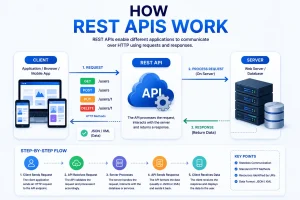
Explain the request-and-response process simply.
Describe clients, servers, endpoints and resources in language.
Explain HTTP methods such, as GET, POST, PUT, PATCH and DELETE with examples.
3.Key Principles of REST Architecture
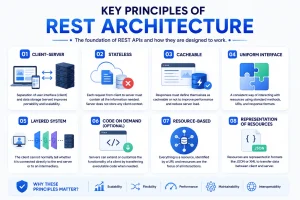
Stateless communication
Client-server separation
Uniform interface
Resource-based architecture
Cacheable responses and layered systems
4. HTTP Methods, Status Codes, and Data Formats
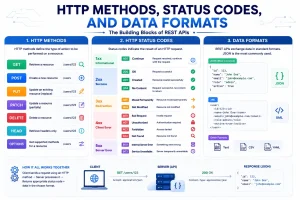
When to use each HTTP method is a topic for developers.
Common HTTP status codes help you understand server responses.
JSON and other data formats are used to send data between client and server.
Headers, parameters and request bodies carry information when you make a request.
5. REST API Example: From Request, to Response illustrates the process.
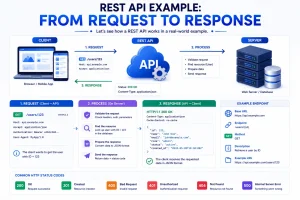
Walk through an API request step by step so you can see how the call works.
Show a sample endpoint so you can copy the URL and try it out.
Demonstrate a request and JSON response so you can understand the data that comes back.
Explain each part of the example so you can see why every piece matters.
6. REST API Authentication and Security which is the point is essential, for protecting data
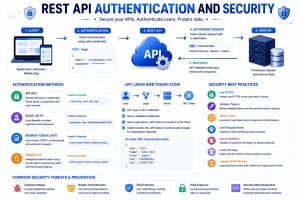
API keys, tokens and OAuth provide authentication.
Secure data transmission guard against eavesdropping.
Authorization and access control enforce permissions.
Common REST API security practices reduce risk.
7. Advantages, Limitations and Common Use Cases show how each approach works.
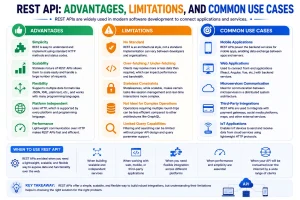
The benefits of using a REST API are many and useful.
The potential limitations and challenges of a REST API can surprise developers.
Real‑world applications of a REST API include apps, websites and third‑party integrations.
A REST API compared with API approaches shows clear advantages.
8: How to Build and Use a REST API
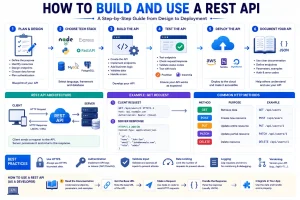
Basic steps for designing an API
Choosing a backend technology
Creating endpoints. Handling requests
Testing and documenting an API
Best practices, for scalable and maintainable REST APIs
2. How REST APIs Work
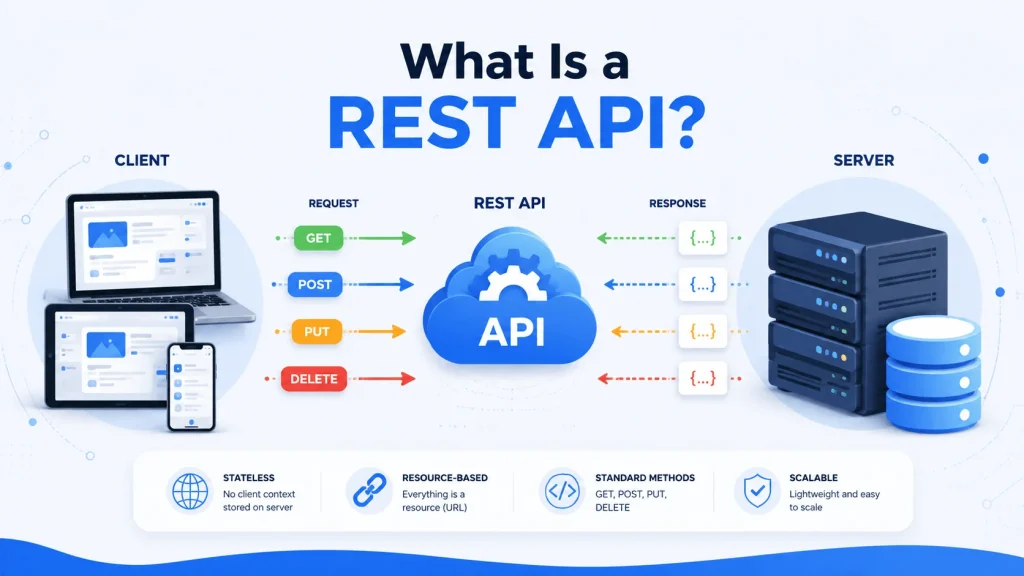
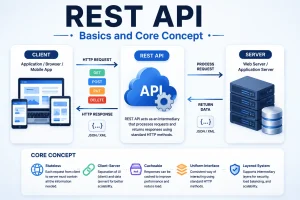
A REST API acts as a bridge that lets a client talk to a server. I find this a starting point.
For example when you open a shopping app and look at your orders the app will send a REST API request to a server. I like to show you how it works.
Client and Server
REST follows a client‑server architecture. The client and the server have responsibilities. I appreciate how clear the roles are.
Client: The application that sends a request. A client can be a website, an app, a desktop application or another service.
Server: The system that receives a request processes it accesses data and sends a response.
This separation makes applications easier to develop and maintain. The client focuses on the user interface while the server handles business logic and data.
REST API Requests
A REST API request usually contains important parts:
URL: Identifies the API resource.
HTTP method: Defines what action the REST API client wants to perform.
Headers: Provide information about the request.
Parameters: Provide information needed by the server.
Request body: Contains data that the REST API client sends to the server when required.
For example:
GET https://example.com/api/users/25
Here GET tells the server that the REST API client wants to retrieve information. The URL identifies the user resource with the ID 25.
API Endpoints
An endpoint is an URL through which a REST API client can access a resource or perform an operation.
For example:
GET /api/users
GET /api/users/25
POST /api/users
PUT /api/users/25
DELETE /api/users/25
Each endpoint can perform an operation.
A REST API may use resources such as:
Users
Products
Orders
Posts
Payments
Categories
For example /api/products could represent a collection of products while /api/products/10 could represent one product.
HTTP Methods
REST APIs commonly use HTTP methods to tell the server what action to perform.
GET is used to retrieve data.
GET /api/products
This could return a list of products.
POST is generally used to create data.
POST /api/products
The request body might contain the products name, price and description.
PUT is commonly used to replace or update an existing resource.
PUT /api/products/10
PATCH is commonly used to update parts of a resource.
PATCH /api/products/10
DELETE removes a resource.
DELETE /api/products/10
These methods give REST APIs a way to work with resources.
REST API Responses
After receiving a request the server processes it. Sends a response back to the client.
A response usually includes:
An HTTP status code
Response headers
Data, in JSON format
For example:
“`
{
“id”: 25
“name”: “John”
“email”: “john@example.com”
}
“`
The client can then use this data to display information to the user.
Example of a Complete Request and Response
Imagine a mobile application needs information about a customer.
The application sends:
GET /api/customers/25
The server receives the request and searches for customer 25.
If the customer exists the server could respond with:
200 OK
Along, with:
“`
{
“id”: 25
“name”: “John”
“email”: “john@example.com”
}
“`
The application receives the response and displays the customers information.
If the customer does not exist the server could return:
404 Not Found
This tells the client that the requested resource could not be found.
Stateless Communication
One important REST principle is statelessness. Each request should contain the information the REST API server needs to process it.
The REST API server does not normally rely on requests to understand the current request.
For example if a user sends a request to access protected data the request can include an authentication token. The REST API server uses that token to determine whether the request is authorized.
Stateless communication makes REST APIs easier to scale because requests can be handled independently by servers.
The REST API Flow
The basic process can be summarized as:
Client → HTTP Request → REST API → Server → HTTP Response → Client
For example:
Mobile App
↓
GET /api/products
↓
REST API
↓
Database
↓
JSON Response
↓
Mobile App
The API is the bridge that connects the application with the server‑side resources.
I think it is helpful to remember that the API is the bridge that connects the application with the server‑side resources.
Understanding this request‑and‑response process is essential before diving into REST principles, authentication, status codes and API design.
4. HTTP Methods, Status Codes and Data Formats
REST APIs rely heavily on HTTP. HTTP gives the methods, status codes, headers and rules that let clients and servers exchange data.
Understanding these elements makes it easier to work with REST APIs and troubleshoot problems.
HTTP Methods in REST APIs
HTTP methods tell the server what the client wants to do with a resource.
GET
GET retrieves data from the server.
For example:
GET /api/products
GET request could return a list of products.
You can also request a resource:
GET /api/products/10
GET request could return the product with ID 10.
GET requests should generally be used for retrieving information than changing data.
POST
POST is commonly used to create a resource.
For example:
POST /api/products
POST request may include product information in its body:
“`json
{
“name”: “Wireless Headphones”
“price”: 49.99
}
“`
Server processes the data and creates a product.
PUT
PUT is commonly used to replace or completely update an existing resource.
For example:
PUT /api/products/10
PUT request body could contain the updated resource:
“`json
{
“name”: “Wireless Headphones Pro”
“price”: 59.99
}
“`
PUT is generally used when the client intends to provide the updated representation.
PATCH
PATCH is used when only part of a resource needs to be changed.
For example:
PATCH /api/products/10
Client might send the field that needs updating:
“`json
{
“price”: 54.99
}
“`
PATCH can be useful when updating a small part of an existing resource.
DELETE
DELETE removes a resource.
For example:
DELETE /api/products/10
Server can use the product ID to identify and remove the resource.
HTTP Status Codes
After processing a request Server returns an HTTP status code. This code tells the client whether the operation was successful or whether something went wrong.
Status codes are grouped into five categories:
1xx: Informational responses
2xx: Successful requests
3xx: Redirection
4xx: Client errors
5xx: Server errors
Some used REST API status codes include:
200 OK
Request was successful.
For example a successful GET request may return:
200 OK
along with the requested data.
201 Created
Request successfully created a resource.
A successful POST request may return:
201 Created
204 No Content
Request was successful. There is no response body to return.
This is often used after deleting a resource.
400 Bad Request
Request could not be processed because the client sent incomplete data.
For example an API may return 400 Request when required fields are missing.
401 Unauthorized
Request requires authentication. The client has not provided valid authentication credentials.
For example an expired or missing authentication token may result in a 401 response.
403 Forbidden
Server understood the request. Refuses to allow access.
This can happen when an authenticated user does not have permission to access a resource.
404 Not Found
Requested resource could not be found.
For example:
GET /api/products/9999
could return 404 Not Found if product 9999 does not exist.
429 Many Requests
Client has sent too many requests within a specific period.
APIs often use this response when enforcing rate limits.
500 Internal Server Error
Something went wrong on the server while processing the request.
This usually indicates a server‑side problem than an issue with the clients request.
Data Formats Used by REST APIs
REST APIs need a way to exchange information, between clients and servers.
JSON (JavaScript Object Notation) is the common format used by modern REST APIs.
A JSON response might look like this:
“`json
{
“id”: 10
“name”: “Laptop”
“price”: 899.99
“: true
}
“`
JSON is popular because JSON is lightweight JSON is easy to read for humans and JSON is supported by every modern programming language.
Other formats can also be used, such as XML, CSV and plain text. However JSON remains the choice for most modern web and mobile APIs.
HTTP Headers
HTTP headers provide information about a request or response.
For example a client can specify that it expects JSON:
Accept: application/json
When sending JSON data the client can specify JSONs content type:
Content-Type: application/json
Authentication information can also be sent through headers. For example:
Authorization: Bearer YOUR_TOKEN
Headers help the client and server understand how the request or response should be handled.
Query Parameters and Path Parameters
REST APIs often need information to identify or filter resources.
A path parameter is part of the URL path:
GET /api/products/10
Here 10 identifies a product.
A query parameter is added after a ? in the URL:
GET /api/products?category=phones&limit=10
Query parameters are useful for filtering, searching, sorting and pagination.
For example:
/api/products?category=phones
could return phones while:
/api/products?page=2&limit=20
could request the page with 20 products.
Request Body
A request body contains data sent from the client to the server. It is commonly used with POST, PUT and PATCH requests.
For example:
POST /api/users
Content-Type: application/json
The body could contain:
{
“name”: “John”
“email”: “john@example.com”
}
The server reads this information. Uses it to create or process the requested resource.
Putting Everything Together
A REST API request can combine several of these elements:
POST /api/users
Content-Type: application/json
Authorization: Bearer YOUR_TOKEN
Request body:
{
“name”: “John”
“email”: “john@example.com”
}
The server may then return:
201 Created
Content-Type: application/json
with a response such as:
{
“id”: 25
“name”: “John”
“email”: “john@example.com”
}
This simple structure is one reason REST APIs are widely used. Clients and servers can communicate using HTTP methods, clear status codes, headers and structured data formats.
2.REST API Example: From Request to Response
The way to understand a REST API is to see how a real request works. Let’s use an online store as an example.
Imagine a shopping app that needs to show a list of products. The app does not usually keep all product details stored locally. Instead it asks the server for this data using a REST API.
Step 1: The Client Sends a Request
The mobile app sends an HTTP request to the API.
For example:
GET https://example.com/api/products
Here:
GET is the HTTP method.
https://example.com is the API server.
/api/products is the endpoint.
products represents the resource the client wants to access.
The request tells the server that the client wants to get product information.
Step 2: The Server Receives the Request
The server gets the request and checks what endpoint was asked for.
It may then:
Check whether the request makes sense.
Verify identity if needed.
Apply business rules.
Look through the database.
Get the needed data.
Send a response back to the client.
For example the server might run a query to find products.
Step 3: The Server Queries the Database
The REST API itself does not usually store the product information permanently. Instead the backend talks to a database like PostgreSQL, MySQL or MongoDB.
The server might pull out information such as:
Product ID: 101
Name: Wireless Headphones
Price: $49.99
Stock: 25
The backend then turns this data into a format the client can read.
Step 4: The Server Sends a Response
If everything goes well the server returns an HTTP response.
For example:
HTTP/1.1 200
Content-Type: application/json
The response body could look like this:
{
“products”: [
{
“id”: 101
“name”: “Wireless Headphones”
“price”: 49.99
“stock”: 25
}
{
“id”: 102
“name”: “Bluetooth Speaker”
“price”: 39.99
“stock”: 18
}
]
}
The 200 OK status means the request succeeded.
Step 5: The Client Processes the Response
The mobile app receives the JSON response. It then turns the data into objects or another structure that its code can work with.
The app can now show the products on the screen:
Wireless Headphones
$49.99
Bluetooth Speaker
$39.99
The user sees the result without needing to know how the API or database works behind the scenes.
A REST API Example With a Specific Product
Now suppose the user taps on the Wireless Headphones.
The app needs details about that product. It can send another request:
GET /api/products/101
The number 101 identifies the product.
The server may return:
{
“id”: 101
“name”: “Wireless Headphones”
“price”: 49.99
“description”: ” headphones with Bluetooth connectivity.”
“stock”: 25
}
The app can then use this data to show the product details page.
Creating Data With POST
REST APIs are not used to get information. They can also create things.
For example suppose a user signs up for an account. The app could send:
POST /api/users
Content-Type: application/json
Request body:
{
“name”: “John”
“email”: “john@example.com”
“password”: “password”
}
The server checks the data. Adds the user to the database.
If successful it might return:
201 Created
with a response such as:
{
“id”: 25
“name”: “John”
“email”: “john@example.com”
}
A real application should never send a users password back in the response.
Updating Data With PATCH
Suppose the user changes their name.
The app could send:
PATCH /api/users/25
Content-Type: application/json
Request body:
{
“name”: “John Smith”
}
The server updates the users name. May return:
200 OK
along with the updated information.
PATCH is useful when only some fields need to change.
Deleting Data With DELETE
Suppose a user removes a product from their saved list.
The app could send:
DELETE /api/wishlist/101
If the operation succeeds the server might return:
204 No Content
The client can then remove the item from the user interface.
What Happens When Something Goes Wrong?
Not every request ends successfully.
For example if the client asks for a product that does not exist:
GET /api/products/9999
The server could respond with:
404 Not Found
It may also include details in JSON:
{
“error”: “Product not found”
}
Similarly an invalid request might produce:
400 Bad Request
An unauthenticated request might return:
401 Unauthorized
These status codes help the client know what happened and how to react.
The Complete REST API Flow
A typical REST API interaction can be summarized like this:
User
Mobile App / Website
HTTP Request
REST API Endpoint
Backend Logic
Database
Backend Logic
HTTP Response
Mobile App / Website
Information Displayed to User
The main point is that the client does not need to know how the server stores or processes the data. It only needs to understand the API’s rules, endpoints, request format and response format.
This separation allows the same REST API to serve different clients. For example a single backend can give data to a Flutter app, a web application and another service.
Once you understand this request-to-response cycle topics like authentication, error handling, API design and security become much easier to grasp.
Modern apps need a way to talk to servers and share data. This is where APIs come in. A REST API is one of the common ways to make that communication happen.
REST APIs let websites, mobile apps and other systems ask for send, update and delete data using HTTP methods. They are simple, flexible and widely supported.
How does a REST API actually work? What are endpoints, HTTP methods, status codes and authentication?. How can you build and use one?
In this guide you’ll learn the basics of REST APIs how they function, their ideas, practical examples, security considerations and best practices.
REST APIs offer an reliable way for applications to talk to servers. They use HTTP methods, endpoints, status codes, headers and formats like JSON to exchange information. From showing products to creating users and updating data REST APIs power modern websites and apps. Understanding how requests and responses flow gives you a base, for building and working with APIs effectively. With security and smart design REST APIs can become a strong part of scalable applications.