

Let’s break down what UI/UX design is in a clear and simple way.
The Simple Analogy: A Coffee Shop
Imagine you’re walking into a coffee shop.
- UX (User Experience) Design is everything that affects your experience from the moment you think about getting coffee until you leave.
- Is it easy to find the menu?
- Is the line organized logically?
- How comfortable are the seats?
- Does the barista make you feel welcome?
- Is the coffee delicious and the cup comfortable to hold?
- The goal of UX is to make this entire process smooth, efficient, and enjoyable.
- UI (User Interface) Design is the look and feel of the specific things you interact with.
- The typography and colors on the menu board.
- The design of the coffee cup and its logo.
- The material and shape of the tables and chairs.
- The layout of the sugar and milk station.
- The goal of UI is to make all these visual elements aesthetically pleasing, consistent, and intuitive to use.
Now, let’s apply this to the digital world.
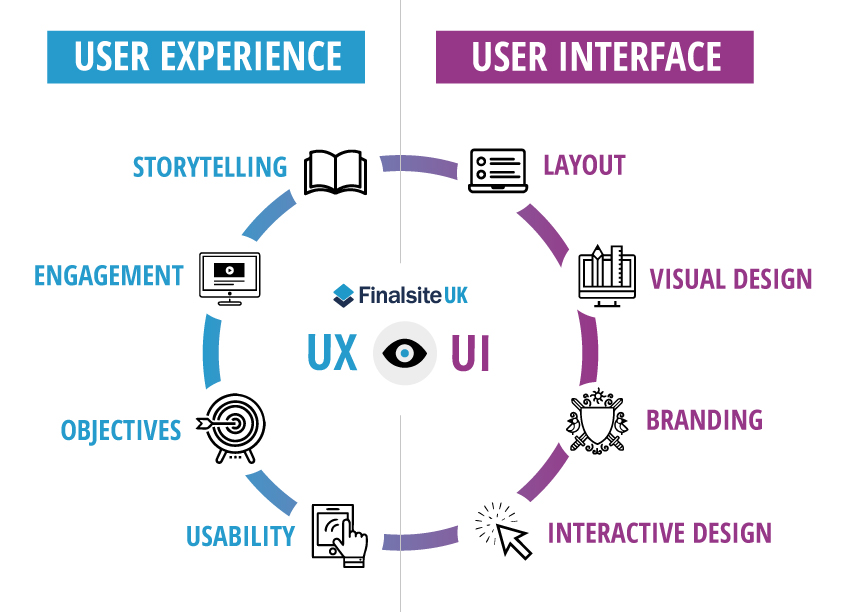
What is UX Design? (User Experience Design)
UX design is the process of creating products that provide meaningful and relevant experiences to users. It’s about the overall feel of the experience.
- Focus: The user’s journey to solve a problem. It’s heavily focused on research, structure, and functionality.
- The UX Designer is like an Architect: They plan the blueprint of a house (the app/website). They decide where the rooms (pages) go, how people will move between them (user flow), and ensure the foundation is solid.
- Key Responsibilities:
- User Research (understanding the audience)
- Wireframing (basic layout sketches)
- Prototyping (interactive models)
- User Testing (validating the design)
- Information Architecture (organizing content)
The question a UX designer answers: “Does this product/website/app make sense to the user? Is it logical, efficient, and delightful to use?”
What is UI Design? (User Interface Design)
UI design is the process of designing the look, feel, and interactivity of a product. It’s a digital craft focused on the user’s visual experience.
- Focus: The product’s aesthetics. It’s about guiding the user through a product’s interface with visual touchpoints.
- The UI Designer is like an Interior Designer: They take the architect’s blueprint and make it beautiful. They choose the color scheme, the flooring, the lighting, and the furniture—ensuring it’s not just pretty, but also functional and consistent with the overall theme.
- Key Responsibilities:
- Visual Design (colors, fonts, images)
- Interactive Elements (buttons, forms, menus)
- Branding and Style Guides
- Responsive Design (making it look good on all screen sizes)
- Animation and Micro-interactions
The question a UI designer answers: “Is this product/website/app visually appealing, consistent, and easy to interact with?”
How UI and UX Work Together
While they are distinct disciplines, UI and UX are deeply interconnected and essential for a successful product.
- You can have a beautiful UI (gorgeous looking) but a bad UX (confusing and frustrating to use).
- Example: A stunning website where you can’t find the “Buy Now” button.
- You can have a great UX (very functional) but a bad UI (ugly and unappealing).
- Example: A government website that gets you the form you need, but it looks like it’s from 1995 and is unpleasant to look at.
The magic happens when both are excellent. A product with great UX and great UI is not only easy and logical to use but also a pleasure to interact with. This builds user trust and loyalty.
Summary Table
| Aspect | UX Design (User Experience) | UI Design (User Interface) |
|---|---|---|
| Focus | The overall feel and functionality | The visual and interactive elements |
| Goal | A smooth, efficient, and satisfying experience | An aesthetically pleasing and intuitive interface |
| Process | User research, testing, wireframing, prototyping | Visual design, branding, layout, interactivity |
| Analogy | Architect (plans the structure) | Interior Designer (makes it beautiful) |
| Output | Wireframes, prototypes, user flows | Mockups, style guides, design systems |
In many companies, especially smaller ones, one person (a “Product Designer”) might handle both UI and UX tasks. However, in larger organizations, these roles are often separate but work very closely together.