

The Simple Analogy: A Coffee Shop
Imagine you’re walking into a coffee shop.
UX (User Experience) is everything that may affect your experience in the coffee shop, starting from the moment you decide to get a coffee and ending with you leaving the place.
Does the menu look nice and is it easy to understand?
Is the queue arranged in a convenient way?
Are the seats comfortable?
Do the baristas wait for you to order with a smile on their face?
Is your coffee delicious and is the cup comfortable to hold?
The purpose of UX is to take care of all details so that the whole process of making and paying for coffee is seamless, quick, and enjoyable.
UI (User Interface) is the appearance of all objects in the coffee shop that you’ll be interacting with.
The fonts and colors on the menu board.
The design and material of coffee cups and logos.
The shape and color of tables and chairs.
The organization and design of the sugar and milk station.
The purpose of UI is to make all the objects look appealing and user-friendly.
Now let’s go back to the digital world.
What is UX Design? (User Experience Design)
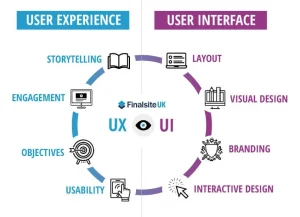
Process of designing products that deliver an appropriate experience to the users. It emphasizes the overall quality of the experience.
Focus is on the user’s problems to be solved by using some specific product. It is research-based and involves its structure and functionality, following the exact rules of the organization.
The UX Designer can be compared to an Architect, who designs the house where people will spend their lives, taking care of every detail and planning the best location for each room.
Responsibilities include:
Conducting Research on the User – getting familiar with the target audience.
Sketching the Basic Structure – wireframing.
Developing Prototypes and Testing Them with Users.
Conducting Research on Information Architecture.
The designer asks him/herself such questions as: Does this product/website/application make sense? Is it intuitive enough?
What is UI Design? (User Interface Design) Essay
UI design is the design of the product’s interface. It is a digital medium where interaction happens. It is a user-based design meaning the user has an essential role in it.
Focus: The product’s graphic appearance. It guides the end-users through the product’s user interface elements.
UI Designer’s role: Similar to an Interior Designer. He works alongside the architect (UX Designer) and makes the rough house pleasant to look at. He works with colors, paints, floors, lighting, and furniture so that the house looks great and functions well. Similarly, the UI designer picks colors, typography, imagery, icons, and interactive widgets to build graphic interfaces that delight users while delivering an accessible and unified experience.
Responsibilities:
Visual design of the product
Design and prototyping of interactive elements
Branding and style guide development
Designing responsive elements
Animations and micro-interactions
The question the UI designer should ask themselves: “Is our product visually appealing and consistent across all platforms?”
How UI and UX Work Together
Though different, UI and UX are closely intertwined and equally important components of any product.
You can have a neat UI (Nice UI design) but a poor UX (Difficult to use).
For example, a beautiful website that has the “Buy now” button hidden somewhere in the 3rd level of menus.
You can have a great UX (Easy to use) but a poor UI (Unattractive)
An example of that might be a government website that manages to get you to the form you need but has an ugly and outdated design that makes you want to leave immediately.
When both are done right, a product or service is not just easy and intuitive but enjoyable to use, which makes customers come back.
Summary Table
| Aspect | UX Design (User Experience) | UI Design (User Interface) |
|---|---|---|
| Focus | The overall feel and functionality | The visual and interactive elements |
| Goal | A smooth, efficient, and satisfying experience | An aesthetically pleasing and intuitive interface |
| Process | User research, testing, wireframing, prototyping | Visual design, branding, layout, interactivity |
| Analogy | Architect (plans the structure) | Interior Designer (makes it beautiful) |
| Output | Wireframes, prototypes, user flows | Mockups, style guides, design systems |
In many companies, especially smaller ones, one person (a “Product Designer”) might handle both UI and UX tasks. However, in larger organizations, these roles are often separate but work very closely together.